


AR Sketch : Sketch & Trace
3.97.00 Reviews
App Specs
- Version
- 1.1.4
- Updated On
- License
- Free
- Downloads
- 500,000+
- Developer
- NowTech - Halo Group
- Categories
- Art & Design
- Platform
- Android
Screenshots
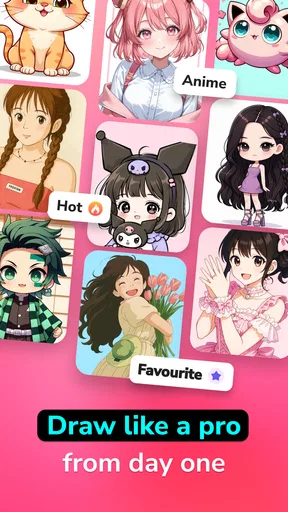
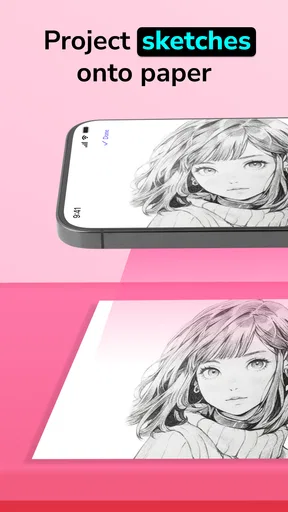
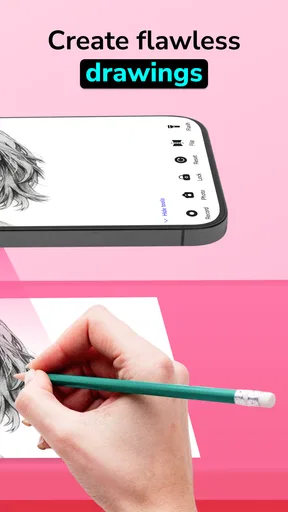
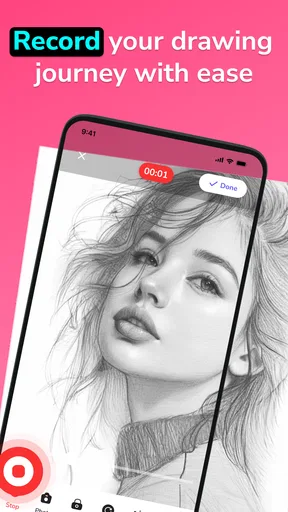

 Analysis by AppCompare
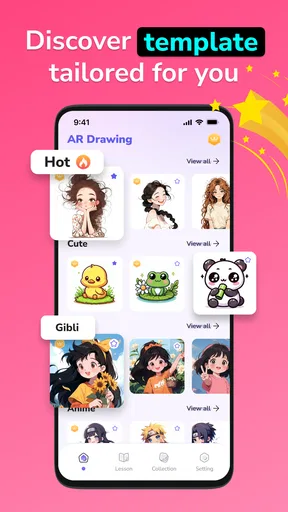
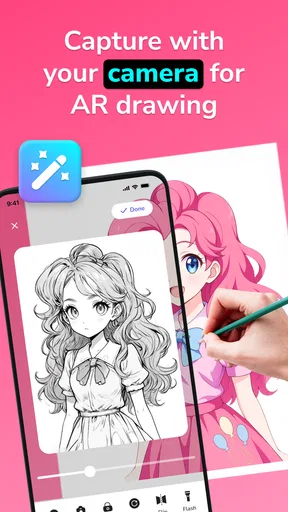
I tried AR Sketch: Sketch & Trace as the kind of app you open when a normal photo feels too ordinary and you want a quick starting point for drawing. Its appeal is immediate: place a reference on your screen, follow the visible lines, and turn a familiar image into an anime or cartoon-style sketch. I found it easier to approach than a blank canvas, especially when I wanted to practice proportions without spending several minutes searching for a suitable reference.
This is a free art and design app from NowTech - Halo Group, aimed at everyone rather than only experienced artists. It has passed half a million installs, which fits its accessible, casual character. The current version is 1.1.4, and it works on Android 7.0 or later. That broad compatibility makes it practical for older phones, although the experience still depends on how clearly your device displays the overlay and how comfortable you are working around a screen.
What feels useful after the first week
During the first few sessions, the most enjoyable part was the reduction of the intimidating first step. Instead of asking myself what to draw, I could begin with a photo and concentrate on observing its outline. That makes the app useful for beginners who want to understand facial shapes, hair masses, clothing folds, or the basic silhouette of an object before attempting a more expressive interpretation.
The AR approach is particularly helpful when I want to transfer an image onto paper. I can position the phone above the page and use the displayed reference as a guide while drawing underneath. This is not the same as projecting a picture onto the paper, so I still have to keep the phone and page aligned. Even so, the method gives me a visual anchor that a printed image beside the page does not always provide.
I also like the distinction between tracing and transforming. A direct outline can be useful for practice, but an anime or cartoon treatment gives me a more stylized reference. That can help when a realistic photograph contains too much detail. Simplifying the image before drawing encourages me to focus on the major shapes rather than getting lost in every strand of hair or tiny shadow.
My most practical early workflow was simple: choose a recognizable portrait, lower my expectations about copying every detail, block in the largest shapes first, and only then add eyes, hair direction, or clothing marks. The app works better as a guide for structure than as a promise of an instant finished illustration. If I treated it as a shortcut to professional artwork, the results felt flat; if I treated it as a visual exercise, it became much more rewarding.
For someone who has never used an AR drawing tool, the first adjustment is learning to keep the reference stable. Small movements can change the relationship between the phone image and the page. I found it easier to work at a table with the paper already positioned, rather than trying to hold everything while drawing. A phone stand or another stable support can make the process less tiring, even though that is an accessory to the workflow rather than a feature of the app.
Worth Reading Before You Choose

EA SPORTS FC Mobile 26 Is a Bigger Football Game, but It Takes Time

Flipboard Shows What News Apps Must Do Beyond the Feed

Switching to Android Auto Means Rethinking Your Driving Routine

Google Calendar Makes a Crowded Week Easier to Manage

Ludo King Makes the Most of the Minutes Between Plans

Baby Panda World Brings Quick Play to Modern Phones, but Its Game Library Feels Busy
The app is also suitable for a quick everyday project. Imagine having a favorite photo from a family gathering and wanting to make a handmade card. Instead of attempting the portrait from memory, I could use the image as a guide, trace the broad contours, and then add my own colors and lettering on paper. The result would still require personal effort, but the app would remove much of the uncertainty at the beginning.
That first-week excitement is real, but it comes partly from novelty. The first few transformations feel more impressive because the process is new. After that, the question becomes whether the tool helps me develop a repeatable drawing habit or merely supplies another way to experiment once in a while.
Where it fits beside ordinary drawing tools
Compared with a sketchbook and a printed reference, AR Sketch keeps the reference visible in the same working area, which can make tracing more direct. Compared with a full digital drawing app, it is less about building a complete illustration inside a large creative workspace and more about using an image as a physical drawing guide. That difference matters: people seeking layers, detailed brushes, extensive editing, or a polished digital painting workflow may be happier with a dedicated drawing application.
It also occupies a different space from automatic cartoon filters. A filter can produce a transformed image immediately, while this app is useful when I want to participate in the drawing process. The trade-off is time and effort. I do not receive a finished artwork simply by selecting a photo; I receive a reference that still depends on my hand, patience, and decisions.
That makes the app a better match for learners, hobbyists, parents looking for a simple creative activity, and anyone who enjoys making physical sketches from personal images. It is less suitable for a professional illustrator who needs precise control over a digital file, or for a user who wants one-tap results with no manual work.
Does it keep earning attention over time?
I’d judge its staying power less by how striking the first transformation looks and more by whether it helps you return to drawing with a clear purpose. A small themed project or a second, unassisted attempt can make each session feel like practice rather than repetition. The next question is how comfortably that routine fits different users, spaces, and ways of working.
Month-to-month value depends on a project, not a novelty hit
After the initial appeal fades, I think the app’s lasting value depends on whether I give it a purpose. Opening it randomly and tracing whatever image appears can become repetitive. Using it as part of a small series works better: portraits of friends, studies of hands, pet sketches, travel memories, or a gradual collection of cartoon interpretations. A continuing theme gives each session a reason to exist.
One useful approach is to use the app for reference preparation rather than final production. I can start with a complicated photograph, use the stylized view to identify the dominant shapes, and then put the phone aside while developing the drawing in my own way. This prevents the work from becoming a mechanical copy and gives the tool a role in learning composition and simplification.
Another worthwhile habit is comparing the traced guide with a second version drawn without it. The first attempt shows where the reference helped, while the second reveals whether I understood the proportions or only followed visible lines. That makes the app more valuable for practice than repeatedly producing nearly identical outlines. It turns a quick tracing session into a small feedback loop.
I would also recommend changing the kind of source image rather than relying only on portraits. A clear object, a simple room detail, or a pet with a strong silhouette can keep the exercises varied. Images with busy backgrounds are less comfortable because they compete with the subject. Choosing photographs with a distinct main shape saves time and makes the AR guide easier to interpret.
The free price makes experimentation easy, but the app includes in-app purchases ranging from $6.99 to $11.99 per item. That means I can begin without paying, which is useful for deciding whether the tracing style suits me. Before purchasing anything, I would spend enough time testing my actual routine: whether I enjoy preparing the phone, stabilizing the page, and finishing the drawing after the novelty has passed. A paid option is only worthwhile if it improves a workflow I already use.
The average rating is 3.9 from around 900 ratings, with seven written reviews shown alongside it. I would read that as a sign of a mixed but generally workable experience rather than universal enthusiasm. For this type of app, personal fit matters more than a rating alone because the same AR process that feels encouraging to a beginner may feel restrictive to someone accustomed to a full drawing tablet setup.
The maintenance burden is small, but the physical setup matters
There is no complicated creative library to maintain in the way a large digital art suite might require. The real maintenance is practical: keeping the phone charged, finding a stable viewing angle, preparing clean paper, and choosing images that remain readable when displayed over the drawing surface. Those small steps can determine whether I use the app regularly or abandon it after one inconvenient session.
Screen glare is another everyday concern. A bright room or reflective page can make the guide harder to follow, while a dim environment may be uncomfortable for drawing. I found that a controlled workspace is more important here than it would be for a normal photo editor. The app itself may be simple, but the physical conditions around it shape the quality of the result.
It is also worth protecting the phone from becoming part of the artwork. Since the device needs to stay close to the page, I would avoid placing it where a pencil, eraser, water, or paint could reach it. This is obvious, but it is easy to forget when concentrating on a line. The best setup is one where the phone is visible and stable without occupying the area where the drawing hand needs to move.
For recurring use, I would keep a small folder of suitable reference photos and separate them by difficulty. Starting with bold silhouettes helps maintain momentum. More detailed faces or scenes can come later, once the hand is comfortable with the relationship between the displayed image and the paper. This simple organization reduces the friction of deciding what to draw every time I open the app.
What may cause fatigue after repeated sessions
The biggest source of fatigue is that AR tracing is not completely hands-free. I still need to manage alignment, watch the screen, control pressure, and decide which lines deserve attention. A short sketch can feel relaxing, but a longer session may become physically awkward because my attention is divided between the phone display and the page.
There is also a creative limitation in following a guide too closely. If I trace every visible contour, the drawing can lose personality. The app is strongest when I use it to understand the image and then choose what to keep. Beginners may initially feel safer copying everything, but that can turn practice into a slow search for accuracy rather than a lesson in visual decision-making.
Repetition can expose another weakness: the basic process does not change dramatically from one image to the next. The subject can vary, but the core action remains selecting a reference and following it. That is why I would not recommend this as my only art tool. It is a useful entry point or occasional reference aid, but it does not replace exercises involving freehand observation, gesture, perspective, color, or digital editing.
People who need exact technical drawings should also look elsewhere. Cartoon and anime transformations are helpful for expressive sketches, but they are not a substitute for measurement-based drafting or a professional illustration workflow. Likewise, anyone expecting automatic conversion into a refined, editable artwork may be disappointed by the amount of manual work still required.
Privacy-conscious users should make a deliberate choice about which personal photos they use. I would begin with non-sensitive images, especially when testing a new tool. That is not a criticism unique to this app; it is simply sensible whenever personal photographs become part of a creative workflow. The safest practical habit is to use images that I would be comfortable keeping in my own art folder and not rely on irreplaceable originals.
Who should make room for it?
I would recommend it to a beginner who feels blocked by a blank page, a casual artist who wants to turn photos into handmade sketches, and a parent or teacher planning a simple drawing activity for an all-ages audience. It is also useful for someone who wants to study how a photograph can be reduced into recognizable lines without committing to a large, complicated art program.
I would skip it if my main goal were professional digital painting, advanced layer-based editing, or instant image effects. A conventional photo filter is faster for immediate results, while a full drawing application offers more control once I already know what I want to create. Choosing this app makes sense when the physical act of drawing is part of the goal, not an inconvenience to remove.
My long-term verdict
AR Sketch: Sketch & Trace earns a place as a focused practice tool, not as a complete art studio. I enjoyed the first-week discovery, and I can see genuine recurring value when it supports a project, a drawing exercise, or a handmade gift. Its strongest quality is the way it turns a personal photo into a manageable starting point for someone who might otherwise avoid drawing.
Its limitations become clearer with time. The setup can be awkward, repeated tracing may feel predictable, and the app cannot supply the creative judgment that makes a sketch feel personal. I would keep it installed if I regularly draw on paper or want a friendly way to study proportions. I would not pay for extras until I had established that habit, because the free starting point is enough to judge whether the method fits.
Overall, I see it as a welcoming bridge between photo editing and hands-on art. It does not eliminate the work, and that is both its weakness and its reason to exist. If you want to draw but need help getting the first lines in the right place, it is worth trying. If you want finished artwork with minimal effort, a different kind of app will serve you better.
Pros
- Simple interface makes tracing tools easy to find and use.
- Augmented-reality overlays help maintain proportions while drawing.
- Useful for beginners practicing outlines
- shapes
- and basic perspective.
- Adjustable opacity keeps the reference visible without fully blocking the page.
- A broad range of reference images supports different drawing exercises.
Cons
- Requires a steady phone position for accurate
- consistent tracing.
- Lighting and camera quality can affect overlay visibility and alignment.
- Some useful brushes or content may be restricted to premium access.
- Long drawing sessions can drain the battery due to continuous camera use.
- The AR overlay may shift if the device moves or tracking loses stability.
FAQs for AR Sketch : Sketch & Trace
What is AR Sketch: Sketch & Trace, and how does it work?
AR Sketch: Sketch & Trace is a drawing assistant that uses augmented reality to help you copy an image onto paper. After selecting or importing a reference picture, the app displays it over the camera view, allowing you to see the projected lines on your drawing surface through your phone. You then trace the visible guide manually with a pencil or pen. It is designed for practice and guidance rather than automatically creating a finished drawing.
Do I need a tripod or any additional equipment to use AR Sketch: Sketch & Trace?
The app can be used with a smartphone alone, but a stable stand, tripod, or improvised phone holder makes the experience considerably easier. Your device needs to remain fixed above the paper so the augmented image does not move while you draw. Good lighting and a flat, uncluttered surface also improve visibility. The app does not physically project an image onto the paper, so the phone must stay positioned where you can comfortably view it.
Can I import my own photos or use only the images included in the app?
AR Sketch: Sketch & Trace generally works best when you can choose a suitable reference image, whether it comes from the app’s available collection or your device’s gallery, depending on the version and permissions provided. High-contrast pictures with clear outlines are easier to trace than dark, busy photographs. Before importing personal images, check the app’s access requests and make sure you have the right to use any copyrighted material.
Is AR Sketch: Sketch & Trace suitable for beginners and experienced artists?
The app is particularly useful for beginners learning proportions, basic shapes, and line placement because it provides a visual guide while they practice. It can also help experienced artists quickly block out a composition or transfer a reference to paper. However, it should not replace learning observation, perspective, shading, and anatomy. The quality of the final drawing still depends on your hand control, patience, paper, and ability to interpret the reference.
Is AR Sketch: Sketch & Trace free, and are there advertisements or in-app purchases?
Availability and pricing may vary according to the Android or iOS version, region, and changes made by the developer. The app may offer a free download with advertising, limited tools, or optional premium features such as additional references, controls, or an ad-free experience. Review the store listing carefully before installing and check the subscription or purchase screen for renewal terms. You should also verify the requested permissions and cancel any trial before it renews if you do not want to continue.


